Windows Weather Radar Software
01 / WINDOWS / Build Your Weather Workstation
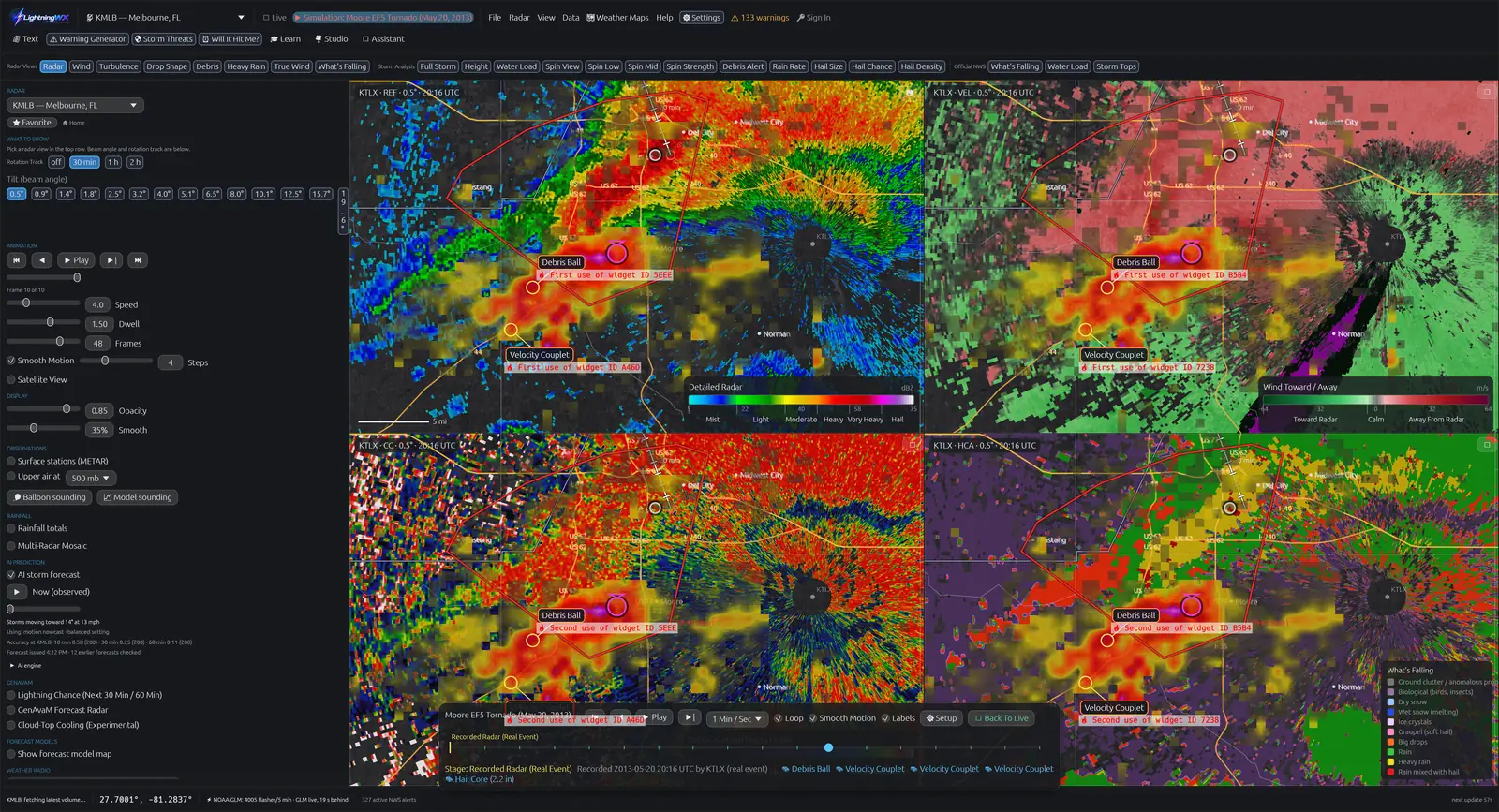
LightningWX is weather radar software for Windows 10 and Windows 11, 64-bit. It combines raw NOAA NEXRAD Level II radar, GOES satellite lightning, storm analysis, 3D Storm Scene and meteorology lessons in one desktop workstation from GenM Software.
Watch current storms, study past events or learn what a velocity couplet means. Start with free Basic Radar, try the desktop tools for five days, or buy the $119 one-time license. LightningWX supports learning and awareness; always follow official National Weather Service warnings.
Choose Your Weather Mission
Start with live reflectivity, velocity, satellite lightning and NWS alerts. Compare radar with the weather outside from a sheltered location.
Explore Every Mission
- Storm spotter: compare reflectivity, velocity, debris clues and NWS warnings.
- Teacher: use Simulation Mode, curated historical cases and the Education Center.
- Weather enthusiast: learn the radar legend, site picker, lightning map and loops.
- Photographer: study storm motion, satellite lightning and lightning-chance outlooks before conditions become hazardous.
One Storm, Three Radar Clues
This original illustration teaches product differences. It is not live radar or an archived radar scan. Use the layer selector and arrow keys on the timeline.
Reflectivity shows returned radar energy. Strong echoes alone do not prove a tornado.
Read the Layer Walkthrough
Reflectivity: locate the precipitation core and curved hook. Velocity: compare the labeled toward and away lobes; their close spacing can suggest rotation. Correlation coefficient: a local reduction can support a debris interpretation only when it is collocated with strong rotation and meteorological context. Low CC alone can have other causes. The schematic uses blue/orange velocity colors so direction is also conveyed in words.
Basic Radar, Trial or License?
Choose by what you want to do. Basic Radar covers live single-site watching. The trial adds public desktop analysis and teaching tools. The license adds capture tools and the unrestricted Past Storms browser.
| Capability | Basic / Free | 5-Day Trial | $119 License |
|---|---|---|---|
| Live Reflectivity and Velocity | Included | Included | Included |
| GOES Lightning and NWS Warnings | Included | Included | Included |
| Dual-Pol and Storm Analysis | Not included | Included | Included |
| 3D Storm Scene and Volume Explorer | Not included | Included | Included |
| Simulation Mode and Curated Cases | Not included | Included | Included |
| Past Storms Archive Browser | Not included | Not included | Included |
| NWS Spotter Reports Layer | Not included | Not included | Included |
| Screenshots and Screen Recording | Not included | Not included | Included |
The free website lessons remain available independently of desktop licensing. The browser workstation requires an eligible active license and internet access; it does not offer a web Basic tier or web trial.
Read the Storm in More Than One View
Reflectivity shows echo strength and precipitation structure. Velocity shows the component of motion toward or away from the radar. Dual-pol products add information about the sampled particles. LightningWX puts these views beside each other, with plain-language labels, to make comparisons easier.
Its 3D Storm Scene and Volume Explorer help you inspect radar-derived structure above the map. These are visualizations of sampled radar data, not camera footage, and they cannot fill every gap in radar coverage. Distance from the radar, terrain, scan timing and beam height all affect interpretation.
Live observations, historical replay, synthetic simulations and forecast products answer different questions. Check the selected mode and time before drawing a conclusion. An interesting shape, model outlook or automated detection is never a substitute for an official warning.
Set Up Your Windows Radar Workflow
- Check requirements and download LightningWX for Windows 10 or 11, 64-bit.
- Choose a nearby NEXRAD site and inspect the scan time and radar legend.
- Compare reflectivity and velocity, then add lightning and official warning overlays.
- Use the Education Center when a term or radar signature needs explaining.
- For deeper study, try 3D, Simulation Mode and the curated case library. Past Storms archive browsing requires a license.
Internet access is needed for live data. Explore the full feature guide, learn Doppler radar basics or read support answers.
Questions, Answered
What is the best radar software for Windows for my needs?
Choose by the tools you need, supported hardware and the way you learn. LightningWX combines NEXRAD Level II, GOES lightning, 3D radar visualization, storm analysis and education on Windows 10 and 11, 64-bit. Try the five-day desktop trial to assess your own workflow; it excludes screenshots, recording, Past Storms and NWS Spotter Reports.
Does LightningWX need a subscription?
No. The launch promotion is $119 one time through April 4, 2027, with no renewal. Basic Radar is free forever.
Does LightningWX include 3D storm visualization?
Yes. Public 3D Storm Scene and Volume Explorer are included in the desktop trial and license. They visualize radar-derived structure and are not camera footage.
Is historical radar live weather?
No. Historical radar shows past observations. Check the event date, radar site and timestamp. Past Storms archive browsing requires a license.
Get LightningWX for $119 One Time
Launch promotion: $119 one time, through April 4, 2027. Yours forever, with no subscription or renewal. Use your account on up to three desktop PCs. Basic Radar is free forever.
The free five-day desktop trial requires a free account and excludes screenshots, screen recording, Past Storms and NWS Spotter Reports. Those features are included with the license. Eligible license holders can also access the web workstation; browser support and features vary.
Science Behind the Tools
Continue with the NWS Radar FAQ, official SKYWARN program, NOAA NEXRAD archive and NWS lightning safety guidance.
By Jen / GenM Software. Reviewed November 11, 2026. LightningWX is an independent learning and weather-awareness tool.
